Thursday, July 6, 2017

Choosing the Best Prepaid Cell Phone Plans

If you prefer lower cost carriers that offer more flexibility, which do not require credit check and contract, then you need to opt for a prepaid cell phone plan. There are many options available in the United States that you can consider to choose from.


This article compiles the review from various wireless carriers to find the best prepaid cell phone plans.

Virgin Mobile


best-prepaid-cell-phone-plans-virgin-mobile


Virgin Mobile uses Sprint's network. It offers the prepaid cell phone plans called Virgin Mobile Love Data. The prepaid plan includes unlimited talk and 5GB of data. You can access unlimited music streaming through selected apps, such as Pandora and iHeart Radio, which is also included in the data plan. The monthly price starts at $35 per month. You can opt for the more expensive $45 per month that gives you 10GB of high-speed 4G LTE data or the $60 per month for unlimited data (which will be slowed down after 22GB of usage per billing cycle). Other interesting features are unlimited text messages and picture messages, unlimited web/email, basic voice mail, auto refill option, call forwarding, call waiting, caller ID, and conference calling.

Another plan offered by Virgin Mobile is called Virgin Mobile Inner Circle. This plan starts at $50 per month (excludes taxes). It gives the subscribers with unlimited data (that will be slowed down after 23Gb of usage per billing cycle). Other benefits offered by Virgin Mobile is similar to the Virgin Mobile Love data. However, in this plan subscribers can enjoy limitless video streaming capped at 480p resolution. This plan is exclusively bounded to iPhone, which the subscribes can purchase starting from $319.99 up to $969.99.

Republic Wireless


best-prepaid-cell-phone-plans-republic-wireless

If you prefer the prepaid cell phone plans with no data included, then Republic Wireless No Data offers the best at the most affordable price. No contracts and commitments required and highest satisfaction for plan costs give Republic Wireless the best value. Subscribers will receive unlimited talk, text messaging, and free data access via WiFi, which is nice. It uses a combination of Sprint's and T-Mobile's networks. However, due to the technology required, there are only few smartphones that are supported by the prepaid plans. You can check the list of their phones for the prepaid plans here.

T-Mobile


best-prepaid-cell-phone-plans


T-Mobile offers a prepaid cell phone plans starting at just $3 per month called Pay As You Go. As it name suggests, subscribers will be given basic packages with 30 minutes of talks or 30 texts (or combination of minutes and texts that add up to 30. Additional minutes and texts are counted for $0.10/each. You can add the LTE data packages by subscribing to the 24 Hour Data Pass or 1-Week Data Pass, which is priced at $5 and $10 respectively. Before you sign up for their service, check the prepaid cell phones here.


Cricket Wireless


best-prepaid-cell-phone-plans-cricket-wireless


Do you want the best prepaid cell phone plans for your family? The Cricken Wireless Basic with Group Save discount offers just that. It operates on the AT&T network, but the LTE data is capped at 8Mbps. You will not notice the difference unless you use it to stream HD videos on the Youtube and access webpages that need a lot of bandwidth. The price started at $100 per month, which will give you 4 lines. You will get unlimited talk and text along with the plans, with 4 GB of LTE data per line. The Cricket's group discount give you the best value for your family. It is inexpensive and you can add the fifth line at no extra cost.

Wednesday, July 5, 2017

Here are The Things You Need to Know About Microsoft Search Engine Bing

Bing is the Microsoft's search engine that has its origins in MSN Search and Windows Live Search. Bing replaced the previous Microsoft's search engine, Live Search, which is available from June 1, 2009.

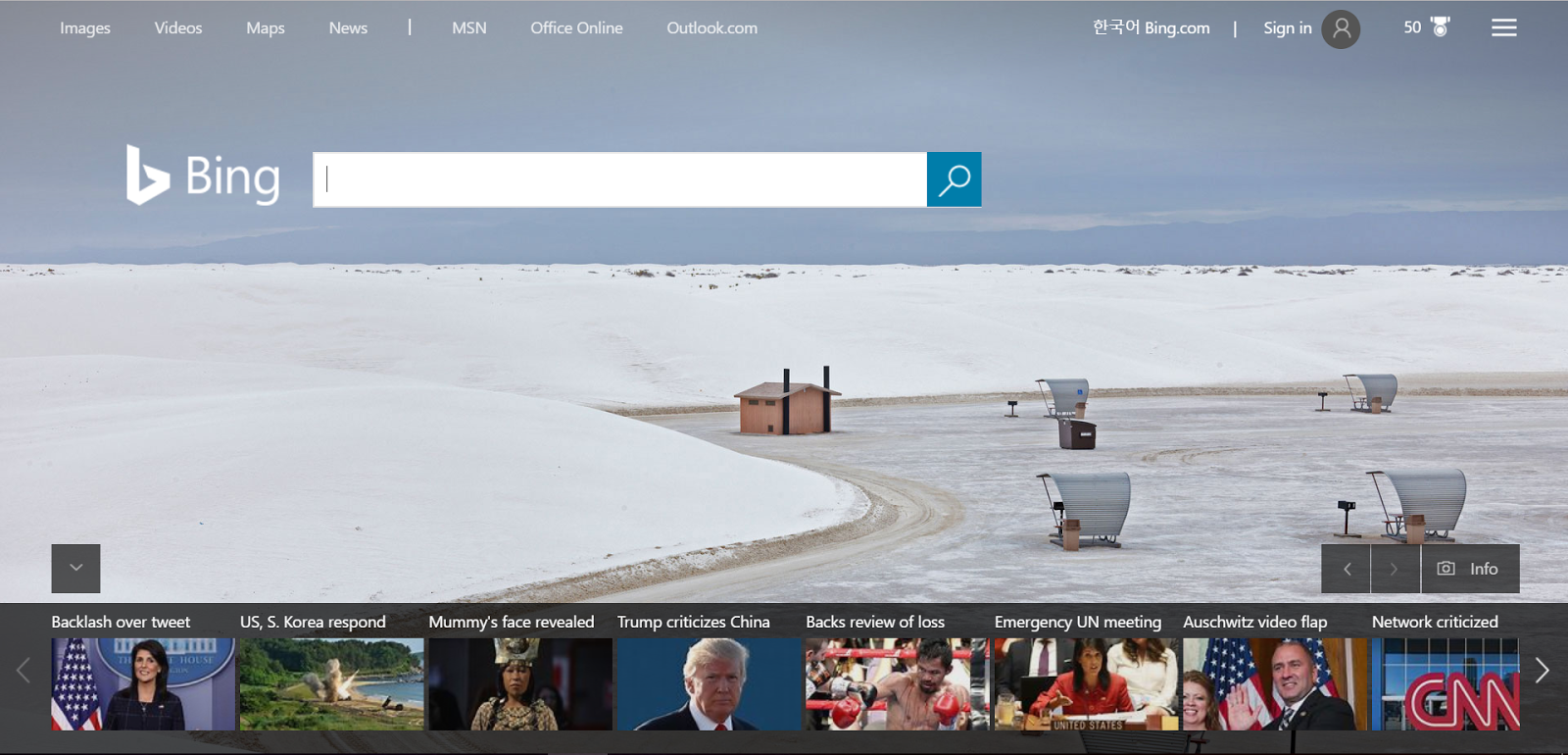
bing-homepage-microsoft-search-engine


Although Google is the most popular search engine in the world, what makes Bing different is its emphasize on aesthetic quality. Bing has also become the alternative search engine in recent years for its efficiency and utility.

If you access the search engine's homepage, you will be presented with a beautiful homepage. The homepage features image that changes daily. At the bottom of the homepage, you can access the latest recent news on the web. If you keep scrolling down, you will see the Image of the Day, which can be downloaded to your computer to be used as a wallpaper. You can give your favorite to the image or share it through the social media thanks to the search engine's inclusive social media integration.

Microsoft has designed Bing with beauty in mind. Bing's results pages are visually attractive. It is clean and neat, makes it appealing to the eyes. Some said that the Microsoft's search engine look like Google in the past. The page is uncluttered and few ads are visible.

Bing has also teamed up with Yahoo! since July 2009. In this ten-year deal, Bing would replace the Yahoo! search engine while retaining the Yahoo! interfaces. The deal also includes that Yahoo! will get to keep 88% of the revenue from ads sales for the first five years of the deal and the right to sell advertising on some Microsoft websites. The transition is made in the early 2012. However, the deal is altered in 2015, in which Yahoo! only requires to use the Bing for majority of searches.

Bing has some features that makes it more visually engaging:

1. Daily changing image of background image
As it is mentioned before, the image on the Bing's homepage changes daily. The image mostly features noteworthy natural landscape, although occasionally it also includes animals, people, and sports. The image sometimes also changes to celebrate the national events, such as the American independence day of Fourth of July. The search engine emphasizes to bring a visually informative search page to its users.

2. Bing has video thumbnail preview
Video thumbnail preview is not something you can find on Google. In Bing, if the result page contains videos, you can hover over the thumbnails and the video will play automatically. It is a really convenient way to get preview over the videos before you click the link to the videos. 

3. Advanced image searches
Users can refine their search results using the filter function. They can select the properties from the image size, color, type, layout, people, data, and license to enhance their search results. Multiple suggestions will be given above the image search results to find images with related keywords.

4. Advanced video search
For me personally, searching video in Bing is much more convenient than in Google. The videos are displayed in thumbnails, and you can see the preview if you hover over the video (although the preview is not available in all videos). There is save button where you can instantly save the videos to your Bing account. In the filter, you can also choose the duration of the video, the published date, resolution, source, and price of the video. You can also check the related keywords on the top of the video search results.

Microsoft has designed Bing to provide instant answers. If you type "NBA" to the search box, you will get instant results about the latest match and scores on the search results' first page. Bing also can display the scores from a specific day and statistics of the teams or players. The Microsoft's search engine is really powerful in providing updated informative news to its users.

bing-microsoft-search-engine-instant-answer


Bing can be used to search for local info as well. Bing can provide current traffic information, business listing, people listing, real estate listings, collections, localized searching for restaurants and services, restaurant reviews, movies played in the area, and hotel listings. For instance, if you type apartments in Washington DC, you will get lists of apartments, their locations, room types, and the prices. You can also directly check the reviews and ratings from people. 

bing-apartment-listing


LG V20: The Android for the Power Users

Last year on September 2016, LG unveiled its new line of G flagship series, the LG V20. Previously rumored as LG V11, LG V20 was packed with ton of features for a single phone. With the 5.7 inch big screen, LG V20 comes to top with the 16 MP rear camera and 8 MP wide-angle lens front camera.

LG V20 is the LG V11 people were talking about. It was the first Android phone outside of the Google Pixel that featured Android Nougat. Although it was released on 2016, this phone still stands through 2017 as one of the best Android phones. LG V20 offers a smooth and refined design in the league of powerful smartphones. It comes with the abundance of awesome hardware and software features that only LG V20 could offer. Unlike most newer powerful smartphones in its class, LG V20 battery is removable.

The design of the phone itself is simply elegant. Although it is relatively big, with the dimension of 159.7 x 78.1 x 7.6 mm, the phone itself is slimmer and lighter than its predecessor. LG removed the textured back that comes in LG V10 but LG V20 is not less resilient to drops. The body is military-grade build and is made up of aluminium back panel that gives the smooth look and feel. The top and bottom parts are made of silicon poly carbonate that helps to protect the phone from serious drops several times.

For the security, LG has combined the fingerprint sensor and power button at the back into one. It might take time to get used with, but the button is tactile and responsive. It feels pretty much the same like the Apple iPhone home button, except that LG put its button at the back of the phone.

The 5.7 inch Gorilla Glass 4 features 2,560 x 1,400 (QHD) resolution. The second screen, which is located at the top of the phone next to the front camera, features a 160 x 1,040 resolution on its 2.1 inch wide screen. The second screen is the LG's innovation to enhance user's experience. It is designed as an additional screen for important functions and notifications, as user can access contacts, put shortcuts, and jump between apps with the help of the second screen.


The chip processor has been upgraded from the Snapdragon 808 to the Snapdragon 820. The integrated Qualcomm Adreno 530 helps with the graphical duties. LG V20 runs with 4GB of RAM, that will keep things running without any problems for mobile games and multimedia playbacks. The baseline amount of onboard storage is 64 GB and users can install additional microSD for external storage. LG V20 supports the cross-platform Vulkan API that will bring the console-quality graphics into the device.

Despite its powerful features and specifications, LG V20 battery life is quite descent. It is equipped with 3,200 mAh removable battery, bigger than its predecessor LG V10. Like any other modern smartphones, the battery could last over a day even with the second screen and Hi-Fi sound mode features. The QuickCharge 3.0 helps fill the battery into 50% in just half hour.

LG V20, in conclusion, is the LG V11 people are hoping for. With its abundance of features, it makes LG V20 one of the best powerful Android smartphones available.


Tuesday, July 4, 2017

Best Emulators for Retro Gaming on Android
There are a lot of options to relieve your childhood memory. Retro gaming is a trend that even Nintendo released a mini version of its Nintendo Entertainment System to bring back the nostalgia of 8-bit gaming. It was an incredible success and sold out almost immediately after its release in November 2016. 

But wouldn't it be incredible if you can take your retro games collection anywhere in your Android smartphones? Although there are a lot of emulators exist, few are actually work fine. In this article we try to help you get the right application for your retro gaming experience. Most of the emulators are going to cost you money but they are worth the investment!

ePSXe (PlayStation Emulator)

Price: $3.75

If you want to bring back your childhood memory of playing the PlayStation games, then ePSXe is the right choice. This PlayStation emulator has high compatibility with almost all titles and boasts good gaming performance. You can remap the button and configure the on-screen controls. You can also connect your own gamepads if you don't like to use the on-screen buttons. The price relatively cheap for all the features it offers.

Get in on Google Play!


Check out the video demo here:


John GBC (Gameboy Color Emulator)

Price: $2.99

Those who miss the Gameboy Color classics should look into John GBC. John GBC is the best Gameboy Color available in the Playstore. It has good performance and high compatibility. The emulation features include fast forward, quick save, support for zipped files, and Bluetooth controller, which are simply amazing.

Get it on Google Play!


SuperRetro 16 (SNES Emulator)

Price: $3.99

SuperRetro 16 remains as the most stable one among other SNES emulators. Compatibility is high and it support network multiplayer. Other amazing features include gamepad support, customizable on-screen controls, cloud sync for save files, chromecast streaming, mouse support and many more.


C64.emu (Commodore 64 Emulator)

Price: $3.99

If you look beyond the Nintendo era, you will find that Commodore 64 was the prima donna in the early 1980s. Although Commodore 64 itself was not only a gaming console, but C64.emu is designed to bring back the glory of Commodore 64 games. It supports various types of cart types, which include zipped format support. The sound modes are available in FastSID and ReSID. It has configurable on-screen multi-touch controls, but you can conveniently connect your bluetooth or USB gamepad and keyboard.

Get it on Google Play!


MD.emu (Sega Genesis Mega Drive Emulator)

Price: $4.99

There are not much Sega Genesis Mega Drive emulator available, but MD.emu is the best on the Play Store. It's an open source software and the most versatile emulator among others. There are long list of additional features, which makes it hard to beat. The sound emulation is very accurate with high quality of re-sampling.

Get in on Google Play!


MegaN64 (Nintento 64 Emulator)

Price: Free

It is the only free application in our list but it doesn't make it less better. Based on the open source Mupen64 project, Mega64 works well in most situations.  It is the fastest and most popular Nintendo 64 emulators on the Play Store. Unfortunately, N64 support in Android is not really good but this emulator still worth a try. It's totally free anyway.

Get it on Google Play!